The free video downloader, converter and screen recorder
Save videos from the web, convert files to any format, record your screen and turn speech into subtitles with offline AI.
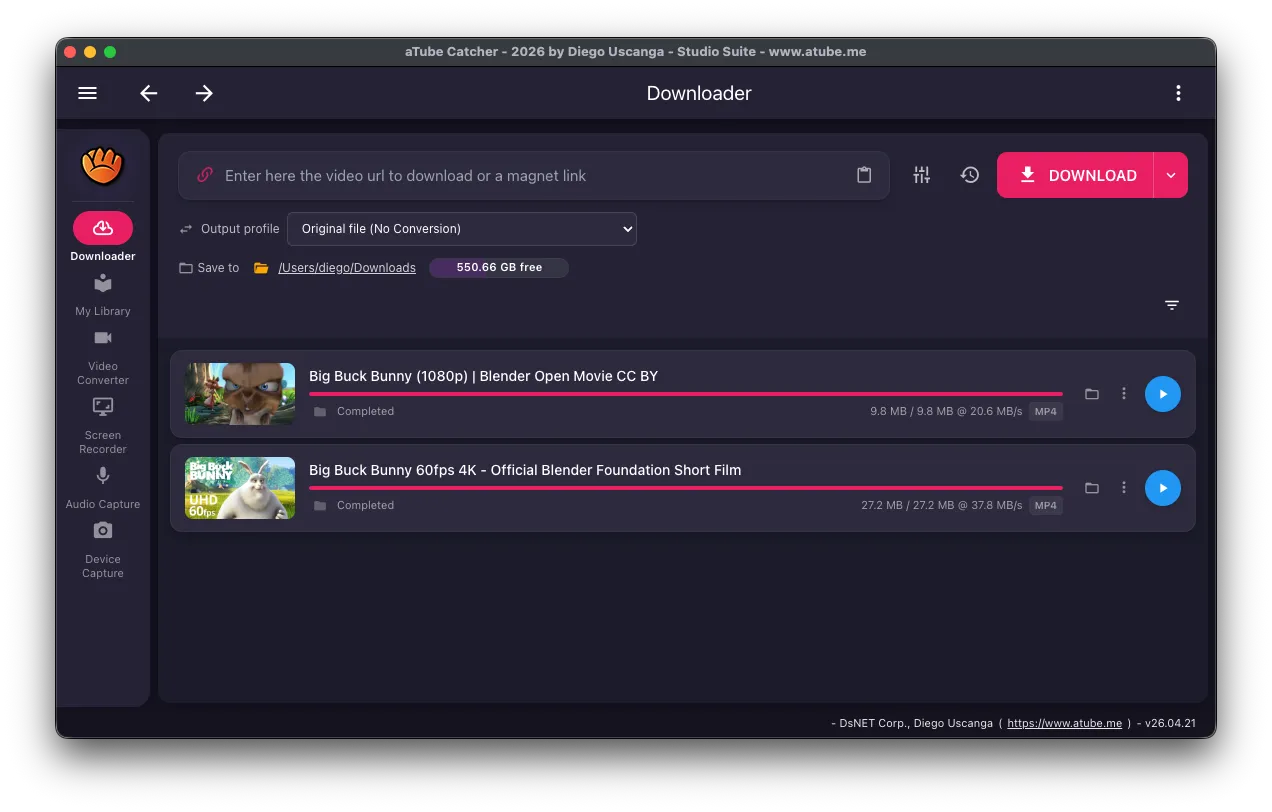
Explore aTube Catcher
A powerful and easy-to-use interface for all your multimedia needs
Active Community
Connect with millions of users and access shared resources
- Access to tutorials and guides
- Active community support
- Regular updates
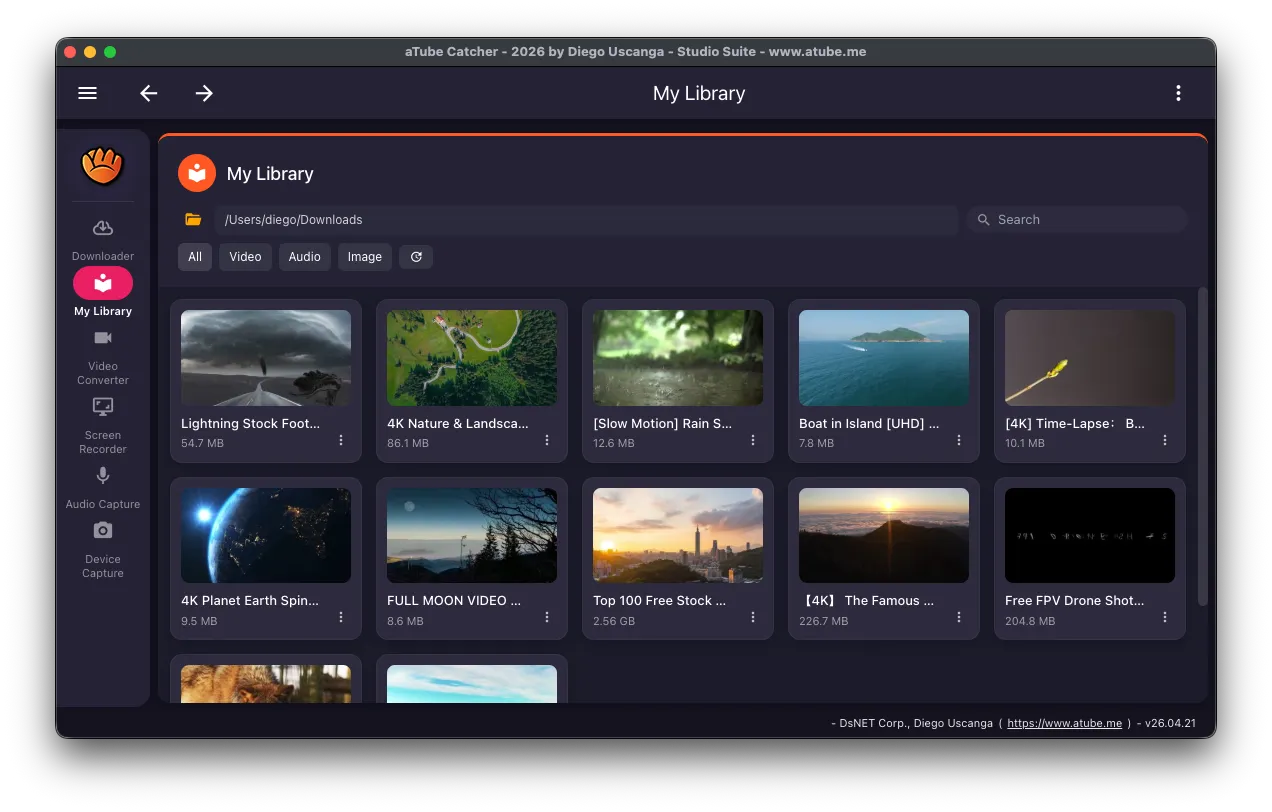
Media Library
Organize and manage your video and music collection with ease
- Complete organized library
- Quick search and filters
- Built-in preview
Why choose aTube Catcher
Stop relying on platforms. Take back control of your media.
Permanent Access
Videos get deleted and channels disappear. Journalists can keep a local copy of the content they rely on.
Offline Reliability
Don’t rely on unstable internet. Download once and watch anywhere, even completely offline.
Audio Freedom
Extract high-quality MP3s from lectures and interviews for efficient listening on the go.
Format Compatibility
Convert media to any format (MP4, AVI, MKV) to ensure it plays on your TV, phone, or car.
All-in-One Tool
Stop using fragmented tools. Download, record, convert, stream via AirPlay & DLNA, and control via Telegram — all in one app.
Privacy by Design
No cloud tracking. All processing happens locally on your machine, keeping your habits private.
Screen Recording
Capture live streams, webinars, and meetings that can’t be downloaded directly.
Study Offline
Download lectures, tutorials, and courses once — review them anywhere, on a flight or with no Wi-Fi.
Professional Use
Essential for teachers, journalists, and editors who need to archive content for work.
Proven Reliability
Stable maturity. A tool that has survived years of platform shifts and is still trusted today.
Distraction-Free Focus
Download tutorials, podcasts, and lectures to playback locally. Regain your focus in the age of distractions.
All-in-One Media Suite
Everything you need in one professional application.
Video Downloader
Save videos from thousands of sites and social networks for your private, personal use. 4K, playlists, and batch downloads supported.
Screen Recorder
Capture webinars, tutorials, and video calls with system audio included.
Video Converter
Convert to any format: MP4, AVI, WMV, MOV. Perfect device compatibility.
Audio Capture
Extract audio from videos. Save to MP3, WMA, or WAV formats.
AirPlay & DLNA Streaming
Receive media from your iPhone, iPad, or any DLNA device directly to your PC.
Cross-Platform
Available on Windows, macOS, and Linux. One app, all your devices.
Powerful Features for Every Need
Professional tools that make video management effortless
Lightning Fast
Optimized download engine for maximum speed
Safe & Secure
No ads inside the app. The direct Windows and macOS installers are code-signed and include no third-party offers.
Batch Downloads
Download multiple videos and playlists at once
4K Quality
Download in ultra-high definition quality
Screen Capture
Record any area of your screen with audio
Format Converter
Convert to MP4, AVI, MKV, and 50+ formats
AI Transcription
Transcribe audio to SRT/VTT subtitles using Whisper AI, with optional subtitle burn-in
Text-to-Speech
Convert text to natural speech with 900+ voices in 50+ languages using Piper TTS
AirPlay Receiver
Receive video from iPhone, iPad, and Mac directly to your PC over AirPlay
UPnP/DLNA Receiver
Receive and save media from any DLNA-compatible device on your network
Telegram Bot
Send download URLs from your phone via Telegram. Control downloads remotely
Cross-Platform
Native support for Windows, macOS, and Linux with a single codebase
Even More Features
Free vs Pro at a glance
The Community edition is free with no time limit. Pro and Lifetime unlock everything below.
| Feature | Free | Pro & Lifetime |
|---|---|---|
| Single-video downloads up to 1080p | ✓ | ✓ |
| 4K, 8K and HDR downloads | — | ✓ |
| Audio extraction to MP3 | ✓ | ✓ |
| Playlists, channels and batch downloads | Up to 10 per batch | ✓ |
| Scheduled downloads | — | ✓ |
| Multi-format video and audio converter | ✓ | ✓ |
| Join, split, resize and chroma-key tools | ✓ | ✓ |
| Full-screen recording with audio | ✓ | ✓ |
| Custom-area screen recording | — | ✓ |
| Offline transcription to subtitles (Whisper) | ✓ | ✓ |
| Separate speakers in transcriptions | — | ✓ |
| Offline text to speech (Piper voices) | — | ✓ |
Lifetime adds updates forever, priority support and a transferable key.
Choose Your Plan
Start free, upgrade when you need more power
Community
Download, convert, record, cast — the basics, free forever. No trackers, no ads in the app.
- Single-video downloads up to 1080p
- MP3 audio extraction
- Subtitle & closed-caption download
- Basic screen & audio recorder
- Multi-format converter (MP4, MKV, MP3, …)
- Cast to UPnP / DLNA devices
Pro
Every power feature, on the official secure build. One-time payment, one year of automatic updates.
Everything in Community, plus:
- Official direct installer — clean, no ad-bundled stub
- Silent in-app updates — always on the latest secure build
- Code-signed on macOS & Windows — antivirus & SmartScreen friendly
- One key, all your machines (for personal use)
- No upgrade prompts, no nag screens, no telemetry on what you download
- Your purchase keeps the free Community edition free for everyone
Lifetime
Pro, forever. Lifetime updates, priority support, transferable key.
Everything in Pro, plus:
- Lifetime updates — every future release, free
- Priority email support — direct line to the maintainer
- 2× daily budget on the AI support assistant
- One-time licence transfer — gift it later if you ever want
- Beta channel — new AI tools and codecs before anyone else
Payment methods: PayPal · Mercado Pago · USDT (TRC20)
Frequently asked questions
Is aTube Catcher free?
Yes. The Community edition is free with no time limit and covers downloading, converting, recording and transcription. Pro ($19.95) and Lifetime ($49) are one-time payments that add the features marked Pro above.
Which computers does it run on?
Windows (x64), macOS (Apple Silicon and Intel) and Linux (x64 AppImage). The Download button detects your system and offers the right installer.
What's the difference between the sponsored and the direct Windows installer?
On Windows, the Download button can offer a sponsored installer that may show optional third-party offers, which you can decline. The direct installers on the Downloads page have no offers. Both install the same app.
Does the app show ads?
No. There are no ads inside the app. The direct Windows and macOS installers are code-signed.
What's the difference between Pro and Lifetime?
Both unlock every feature. Pro is a one-time payment with one year of automatic updates. Lifetime adds updates forever, priority support and a transferable key.
How do I activate Pro after buying?
Your key arrives by email. In the app, open Activate your license, enter your email and paste the key.
Do I need an account to download the app?
No. You can download and use the free edition without signing up.
Can I download any video?
Only download videos and audio you own, that are in the public domain or under a license that allows it, or that the rights holder lets you save. Check the terms of the site you download from.
Start with the free edition
Download aTube Catcher for Windows, macOS or Linux. Upgrade to Pro only if you need more.