Free video downloader for your desktop
Paste a video link, choose how you want the file, and aTube Catcher saves it to your computer.
Windows · macOS · Linux
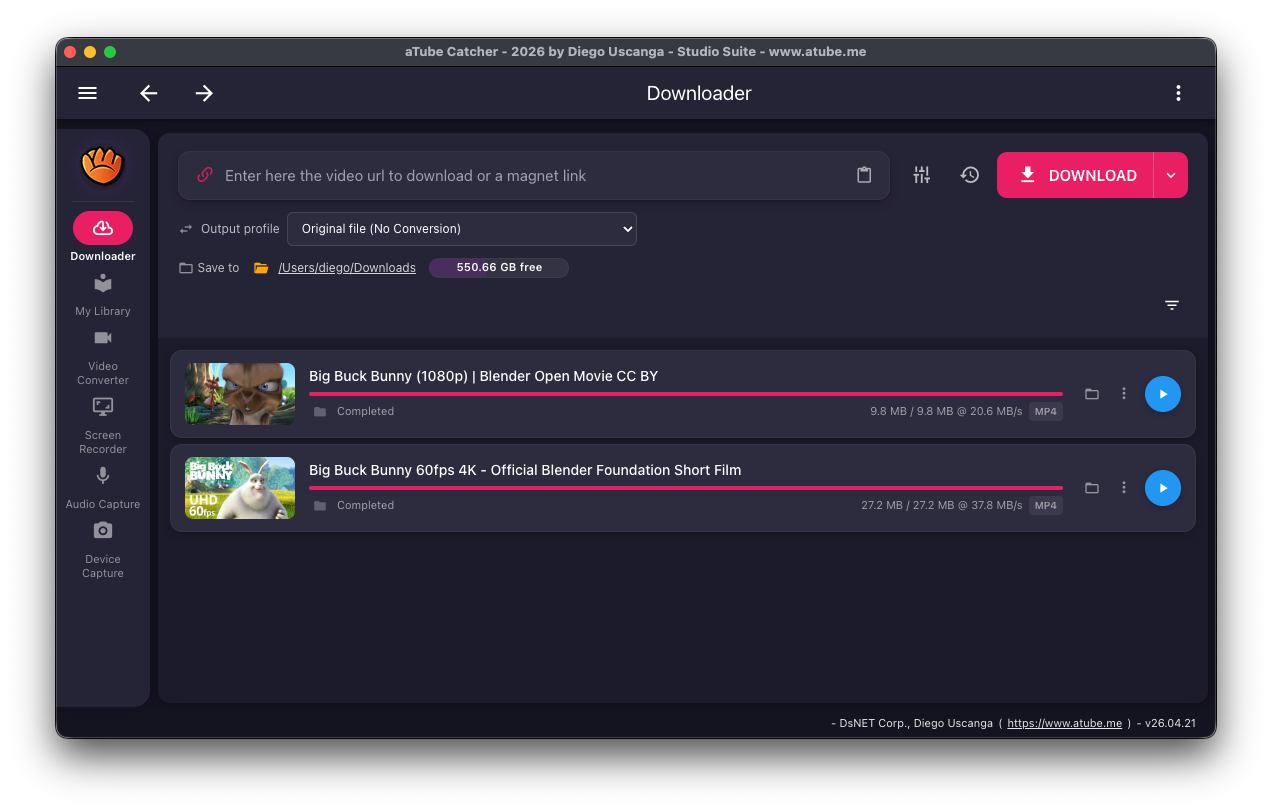
aTube Catcher runs on your own computer, so downloads go straight to a folder you choose instead of passing through a website full of pop-ups. It works with links from YouTube, Vimeo, SoundCloud and many other sites supported by its download engine.
You can keep the original file or convert it while it downloads, using the same output profiles as the built-in converter.
What you can download
- Single videos up to 1080p Free
- Audio only, as MP3 Free
- Subtitles and closed captions Free
- 4K, 8K and HDR video Pro
- Playlists, channels and lists of links Free
- Scheduled downloads Pro
How to download a video
-
Copy the link
Open the video in your browser and copy its address from the address bar or the share button.
-
Paste it in aTube Catcher
In the Downloader, paste the link into the box that says "Enter here the video url to download or a magnet link". The clipboard button next to it pastes for you.
-
Pick an output profile
Leave "Original file (No Conversion)" to keep the file as it is, or choose a profile such as MP4 or MP3 to convert while downloading.
-
Choose where to save
Next to "Save to", click the folder to change the destination. The free space on that drive is shown beside it.
-
Click Download
The download appears in the list with its progress. When it finishes, play it from the list or open its folder.
Platforms and limits
- Windows (x64), macOS (Apple Silicon and Intel) and Linux (x64 AppImage).
- Which sites work depends on the download engine. When a site changes, downloads from it can stop working until the next engine update.
- Single videos up to 1080p are included in the free Community edition; 4K, 8K and HDR need Pro. The list above shows the edition for each option.
Use content you have the right to download
Only download videos and audio you own, that are in the public domain or under a license that allows it, or that the rights holder lets you save. Check the terms of the site you are downloading from.
Frequently asked questions
Is the video downloader free?
Yes. The Community edition is free with no time limit and downloads single videos up to 1080p. Pro is a one-time purchase that adds 4K/8K/HDR and scheduled downloads, among other features.
Which sites does it support?
YouTube, Vimeo, SoundCloud and many other sites supported by its download engine. If a link doesn't work, update aTube Catcher to get the latest engine.
Can I download only the audio?
Yes. Choose an MP3 output profile before you click Download, or use Extract MP3 in the converter afterwards.
Where are my downloads saved?
In the folder shown next to "Save to" in the Downloader. You can change it at any time.
Related features
Try aTube Catcher free
The Community edition is free with no time limit. Upgrade to Pro when you need more.